Updated August 2, 2026: Brazil's first alphanumeric CNPJ now exists. The Receita Federal (Brazil's federal tax authority) announced the issuance of
00.000.000/E08G-12, a Banco do Brasil branch. This is no longer preparation for a future deadline: the format is live and will start showing up in registrations, integrations and fiscal documents. If your system still validates CNPJs with^\d{14}$, it is already rejecting a valid document — the "Impact on existing systems" section below is your checklist.Earlier update — March 10, 2026: Nota Técnica ENCAT 2025.001 (a technical note from Brazil's state tax administrators' forum) confirmed the staging (April 6, 2026) and production (July 6, 2026) dates for electronic fiscal documents, and the Receita Federal signaled a gradual rollout starting with large companies.
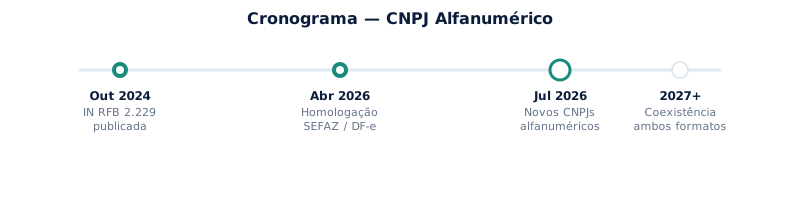
In October 2024, the Receita Federal published Instrução Normativa RFB nº 2.229/2024 (a normative ruling), establishing that starting in July 2026, new registrations in the CNPJ (Brazilian company registration number) system would include alphanumeric characters — letters A through Z in addition to digits 0 through 9. That deadline has now passed: the first alphanumeric CNPJ has been issued.
The change does not affect existing CNPJs. If your company's CNPJ is 12.345.678/0001-95, it stays exactly as it is. The new format applies only to new registrations issued after the cutoff date.
The reason is practical: the current all-numeric scheme supports about 100 million combinations. With roughly 60 million active registrations and around 6 million new companies per year, exhausting the available combinations is a matter of a few years. Introducing letters expands the address space to billions of combinations.
This article approaches the topic from the developer's perspective: what changes in the format, how to compute the new check digits, what to review in your systems, and working validation code.
What changes in the format
The CNPJ still has 14 positions — the same length as always. The difference is the character set accepted in each group of positions:
| Positions | Role | Current format | New format |
|---|---|---|---|
| 1–8 | Root (identification) | Digits only (0–9) | Alphanumeric (0–9, A–Z) |
| 9–12 | Establishment number | Digits only (0–9) | Alphanumeric (0–9, A–Z) |
| 13–14 | Check digits | Digits only (0–9) | Digits only (0–9) |
In practice, the first 12 positions will accept uppercase letters, while the two check digits remain numeric.
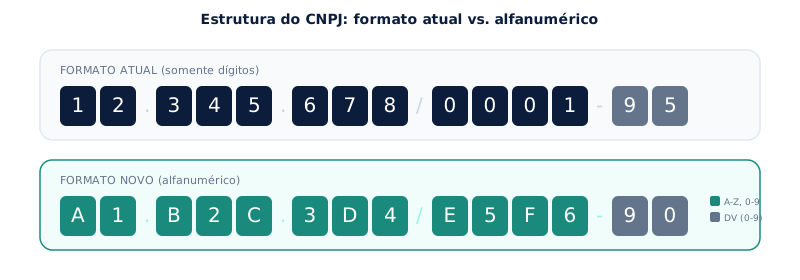
The display mask with dots, slash and hyphen keeps the same pattern — what changes is the content of each position.
Which letters are allowed
There are indications in ENCAT technical discussions that some letters may be excluded from the allowed set (possibly I, O, U, Q and F, to avoid visual confusion). As of this article's publication date, the Receita Federal has not officially confirmed a restricted list. The recommendation is to code defensively: accept A–Z for now and adjust once the definitive list is published.
Follow the RFB's official page: CNPJ Alfanumérico.
The new check-digit calculation
The check-digit calculation still uses Modulo 11 with weights from 2 to 9 — conceptually the same algorithm as today's numeric CNPJs. The difference is how each character is converted to a numeric value before the multiplication.
Conversion rule
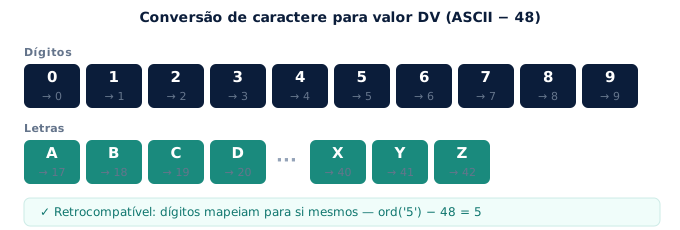
Each character (digit or letter) is converted using its decimal ASCII value minus 48:
Valor para DV = código ASCII do caractere − 48
This produces the following table:
| Character | ASCII | Check-digit value |
|---|---|---|
0 |
48 | 0 |
1 |
49 | 1 |
2 |
50 | 2 |
| ... | ... | ... |
9 |
57 | 9 |
A |
65 | 17 |
B |
66 | 18 |
C |
67 | 19 |
| ... | ... | ... |
Z |
90 | 42 |
The elegant detail of this approach: for numeric CNPJs, ord('0') - 48 = 0, ord('1') - 48 = 1, and so on — the conversion reproduces today's behavior exactly. The new algorithm is backward-compatible by design.
Step by step, with an example
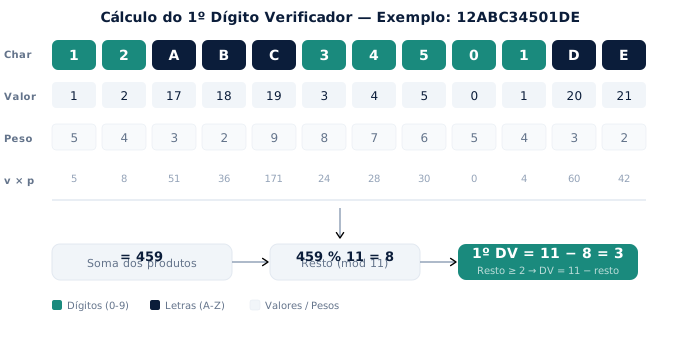
Using the fictitious alphanumeric CNPJ 12ABC34501DE (the example from the official SERPRO documentation — SERPRO is Brazil's federal data-processing agency):
First check digit:
- Convert each character to its check-digit value:
CNPJ:  1   2   A   B   C   3   4   5   0   1   D   E
Valor: 1   2   17  18  19  3   4   5   0   1   20  21
- Assign weights 2 through 9 from right to left (restarting after 9):
Peso: 5 4 3 2 9 8 7 6 5 4 3 2
- Multiply value × weight and sum:
5 + 8 + 51 + 36 + 171 + 24 + 28 + 30 + 0 + 4 + 60 + 42 = 459
- Compute the remainder:
459 % 11 = 8 - Since the remainder is ≥ 2: 1st check digit = 11 − 8 = 3
Second check digit:
Repeat the process including the first check digit as the 13th character:
CNPJ:  1   2   A   B   C   3   4   5   0   1   D   E   3
Valor: 1   2   17  18  19  3   4   5   0   1   20  21  3
Peso:  6   5   4   3   2   9   8   7   6   5   4   3   2
Sum: 6 + 10 + 68 + 54 + 38 + 27 + 32 + 35 + 0 + 5 + 80 + 63 + 6 = 424
Remainder: 424 % 11 = 6 → 2nd check digit = 11 − 6 = 5
Final result: 12.ABC.345/01DE-35
If the remainder is 0 or 1, the check digit is 0 (zero).
Impact on existing systems
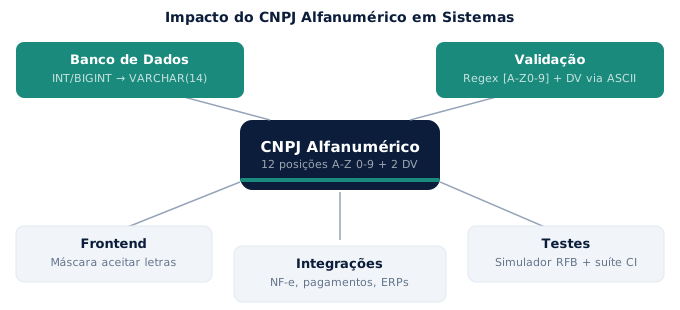
The change is simple in concept, but the impact depends on how many parts of your system touch CNPJ fields. Below are the main areas to review.
Database
If the CNPJ field is stored as INT, BIGINT or any numeric type, it needs to migrate to VARCHAR(14) or CHAR(14). Without that change, the database will reject any CNPJ containing letters.
If you already use VARCHAR or TEXT, check for constraints that reject letters — a CHECK with a regex like ^\d{14}$ will block the new CNPJs. Indexes built on numeric columns may behave differently (collation, sort order) after migrating to strings — it's worth testing the performance of critical queries after the conversion.
Validation code
Most systems validate CNPJs with a regex like ^\d{14}$ or ^\d{2}\.\d{3}\.\d{3}/\d{4}-\d{2}$. Both reject letters.
The updated regex for an unmasked CNPJ must accept alphanumerics in the first 12 positions and digits in the last 2:
^[A-Z0-9]{12}\d{2}$
With the mask:
^[A-Z0-9]{2}\.[A-Z0-9]{3}\.[A-Z0-9]{3}/[A-Z0-9]{4}-\d{2}$
Beyond the regex, the check-digit function needs updating to use the ASCII conversion described in the previous section.
Frontend and input masks
Form fields that format CNPJs with a mask (dots, slash, hyphen) usually accept digits only — the masking function typically runs a replace(/\D/g,'') that wipes the letters on every keystroke. That is the defect to fix: allow [A-Z0-9] in the first 12 positions of the input.
inputmode="numeric", on the other hand, is a UX call rather than a correctness one. It only hints at which virtual keyboard the phone opens — it does not block typing or pasting letters into a type="text" field. Keeping it favors the numeric majority and lets alphanumeric CNPJs arrive by copy-paste; switching to text makes a CNPJ with letters typable on mobile, at the cost of the large keypad. Either works, as long as the mask stops discarding letters — what doesn't work is fixing the keyboard and leaving the replace in place.
Integrations
APIs that send or receive CNPJs need to accept the new format. That includes integrations with payment gateways, electronic invoice issuers (NF-e, NFS-e — Brazil's electronic invoices), banking systems, CRMs and ERPs. The XML schemas for electronic fiscal documents have already been updated by SEFAZ (the state tax authorities) to accept the alphanumeric format.
Testing
The Receita Federal has released a national alphanumeric CNPJ simulator that generates fictitious CNPJs in the new format. Use it to create test data — and add alphanumeric CNPJs to your automated suite now, because the format is already in circulation.
Nota Técnica ENCAT 2025.001 set the SEFAZ staging environment to accept alphanumeric CNPJs starting April 6, 2026, and production starting July 6, 2026 — both dates have now passed.
One warning that only shows up in practice: every system in the chain adapts at its own pace. Government portals with JavaScript input masks, payment gateways and ERPs may keep dropping the letters for a while, even after the rule takes effect. If you integrate with third parties, test each one with an alphanumeric CNPJ instead of assuming the deadline settled it.
Code: validating an alphanumeric CNPJ
Below are working implementations in Python and JavaScript. Both accept CNPJs with or without the mask, support both the current numeric format and the new alphanumeric one, and compute the two check digits via Modulo 11 with ASCII conversion.
Python
import re

def validar_cnpj(cnpj: str) -> bool:
    """
    Validates a numeric or alphanumeric CNPJ.
    Accepts input with or without the mask (dots, slash, hyphen).
    """
    # Strip the mask
    cnpj = re.sub(r'[.\-/]', '', cnpj).upper()

    # 14 characters: 12 alphanumeric + 2 digits
    if not re.match(r'^[A-Z0-9]{12}\d{2}$', cnpj):
        return False

    # Reject uniform sequences (e.g. "00000000000000")
    if len(set(cnpj)) == 1:
        return False

    def char_value(c: str) -> int:
        return ord(c) - 48

    def calc_dv(chars: str, weights: list[int]) -> int:
        total = sum(char_value(c) * w for c, w in zip(chars, weights))
        remainder = total % 11
        return 0 if remainder < 2 else 11 - remainder

    # First check digit: 12 characters, weights [5,4,3,2,9,8,7,6,5,4,3,2]
    weights_1 = [5, 4, 3, 2, 9, 8, 7, 6, 5, 4, 3, 2]
    dv1 = calc_dv(cnpj[:12], weights_1)

    # Second check digit: 13 characters, weights [6,5,4,3,2,9,8,7,6,5,4,3,2]
    weights_2 = [6, 5, 4, 3, 2, 9, 8, 7, 6, 5, 4, 3, 2]
    dv2 = calc_dv(cnpj[:12] + str(dv1), weights_2)

    return cnpj[-2:] == f"{dv1}{dv2}"


# Tests
assert validar_cnpj("12.ABC.345/01DE-35") == True   # alphanumeric (SERPRO example)
assert validar_cnpj("12ABC34501DE35") == True         # unmasked
assert validar_cnpj("11.222.333/0001-81") == True     # traditional numeric
assert validar_cnpj("11.222.333/0001-82") == False    # invalid check digit
assert validar_cnpj("00.000.000/0000-00") == False    # uniform sequence

print("Todos os testes passaram.")
JavaScript / Node.js
/**
 * Validates a numeric or alphanumeric CNPJ.
 * Accepts input with or without the mask (dots, slash, hyphen).
 * @param {string} cnpj
 * @returns {boolean}
 */
function validarCnpj(cnpj) {
  // Strip the mask
  cnpj = cnpj.replace(/[.\-/]/g, "").toUpperCase();

  // 14 characters: 12 alphanumeric + 2 digits
  if (!/^[A-Z0-9]{12}\d{2}$/.test(cnpj)) return false;

  // Reject uniform sequences
  if (new Set(cnpj).size === 1) return false;

  const charValue = (c) => c.charCodeAt(0) - 48;

  function calcDv(chars, weights) {
    const total = chars
      .split("")
      .reduce((sum, c, i) => sum + charValue(c) * weights[i], 0);
    const remainder = total % 11;
    return remainder < 2 ? 0 : 11 - remainder;
  }

  const weights1 = [5, 4, 3, 2, 9, 8, 7, 6, 5, 4, 3, 2];
  const weights2 = [6, 5, 4, 3, 2, 9, 8, 7, 6, 5, 4, 3, 2];

  const dv1 = calcDv(cnpj.slice(0, 12), weights1);
  const dv2 = calcDv(cnpj.slice(0, 12) + dv1, weights2);

  return cnpj.slice(-2) === `${dv1}${dv2}`;
}

// Tests
console.assert(validarCnpj("12.ABC.345/01DE-35") === true);
console.assert(validarCnpj("12ABC34501DE35") === true);
console.assert(validarCnpj("11.222.333/0001-81") === true);
console.assert(validarCnpj("11.222.333/0001-82") === false);
console.assert(validarCnpj("00.000.000/0000-00") === false);

console.log("Todos os testes passaram.");
cURL + the FonteData API
If you'd rather not maintain the validation logic in your own system, you can delegate to an API that already handles both formats. FonteData accepts alphanumeric CNPJs in every lookup:
# Lookup with an alphanumeric CNPJ — this example uses the first
# alphanumeric CNPJ issued in Brazil, a Banco do Brasil branch
curl -H "X-API-Key: SUA_API_KEY" \
  "https://app.fontedata.com/api/v1/consulta/cadastro-pj-basica?cnpj=00000000E08G12"
The response returns the CNPJ's complete registration data, with no need for the developer to implement validation, format conversion or error handling for the new standard. The API accepts both the current numeric format and the alphanumeric one, with or without the mask.
Readiness checklist
An actionable summary to bring to your engineering team:
- Database: audit CNPJ fields — migrate numeric types to
VARCHAR(14)orCHAR(14), review constraints and indexes - Validation regex: update to accept
[A-Z0-9]in the first 12 positions - Check-digit calculation: implement the ASCII conversion (
ord(char) - 48) or adopt an API that already supports it - Frontend: update input masks to accept uppercase letters, remove
inputmode="numeric"from CNPJ fields - Integrations: verify that APIs, webhooks and XML schemas accept alphanumeric characters in CNPJ fields
- Automated tests: include alphanumeric CNPJs generated by the RFB simulator
- Monitoring: follow RFB announcements for the definitive list of allowed letters
Conclusion
The migration to alphanumeric CNPJs is straightforward in concept — letters enter the identifier, the check-digit calculation gains an ASCII conversion, and the length stays the same. The real impact depends on how many systems in your stack touch CNPJ fields: databases, validations, input masks, fiscal integrations, payment gateways.
The first CNPJs with letters are already circulating, so there is nothing left to get ahead of — what remains is finding where your system breaks before a customer finds it for you. The checklist above covers the main points; start with the database audit and the validation functions, which is where ^\d{14}$ tends to hide.
One detail that catches people out: the most common failure mode isn't a loud error, it's a silent one. A replace(/\D/g,'') doesn't reject 00.000.000/E08G-12 — it turns it into 000000000812, a 12-digit document that travels on and fails somewhere else, far from the cause. Hunt for the digit filters, not just the validators.
FonteData already supports alphanumeric CNPJs in every lookup. Create your free account and get your first top-up doubled — up to R$ 500 in bonus credits, no credit card to sign up.
References
Try the FonteData API
Query Brazilian company and individual data via API — CNPJ, CPF, KYC, compliance and more. First top-up doubled — up to R$ 500 in bonus credits.
Create free account →